Summary
Within the Opus platform, the Search tool allows users to identify recently uploaded documents on an ad-hoc basis, by using the Upload Date metadata value. Users can then review the results within the Search tool or export the results as required.
The Upload Date metadata only shows the date that the original document was uploaded. If the document is replaced or moved, this value does not change and there is no way to identify or search for a replacement or movement date.
Upon request, Solution Operations team are able to assist in producing an index on the same basis, being chargeable at standard content management rates. Alternatively, the Bundle Updates feature can be enabled allowing for new documents to be housed in a custom bundle structure on a rolling basis when they are uploaded.
We've set out below how to use the Upload Date within the Search tool.
More information on how to:
- Enable Bundle Updates can be found here.
- Use the Search tool can be found here.
- Export Search results (Metadata index and documents) can be found here.
Using the Upload Date in Search
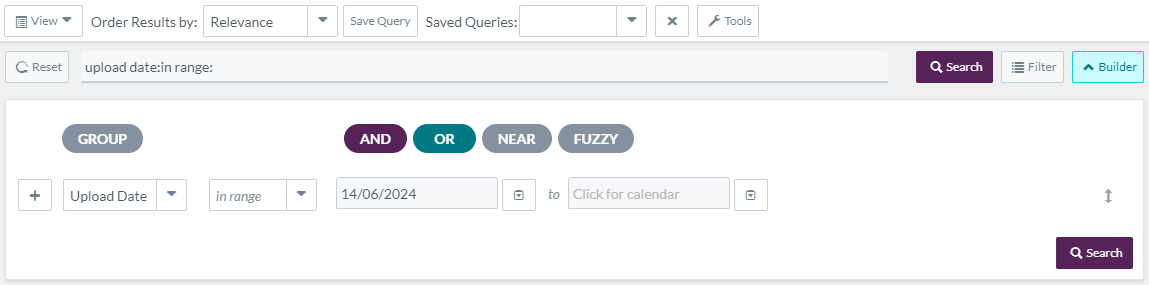
- Open Builder Tool - From the Search page, press Builder to open the builder tool.
- Populate Builder - Select the relevant field, condition and term to build the Search query:
- Field (First Dropdown) - Change the Field value (first dropdown) to be Upload Date.
- Condition (Second Dropdown) - Change the Condition value as required.
- Term (Third Dropdown) - Input or use the Calendar picker to populate the Term with the relevant Date value.
- Run Search - Press Search or Enter on the Keyboard to run the search. The page should change to show the number of matches and results when complete.
- Review / Export Results - Either review the results within the Search tool, or export an index of the metadata or the documents themselves to use as required.
A filter can be applied to narrow the results down to particular bundles.